

Hyphens in technical copy: Time for context-based rules


A rule that works in a printed paragraph can fail inside a link, a slug, a menu label, or an error message. That is the problem with many dash rules in technical editing. They treat every string of text as prose, when technical copy often includes interface labels, file names, URLs, commands, headings, identifiers, and generated content.
The result is familiar: an editor changes a hyphen to an en dash because the style guide says so, then the developer changes it back because the copy now looks odd, breaks a pattern, or no longer matches the product.
Both sides have a point. The old rules are not useless. They are just incomplete.
Printed prose is not the only editing context
Traditional punctuation rules make sense in sentences. A hyphen joins words, an en dash shows a range or relation, and an em dash marks a break in thought. That works well in book text, articles and long-form documentation.
Technical copy has more layers. It must work for humans, machines, search, accessibility tools, translation memory and product consistency.
That is where many proofreading habits go wrong. They edit the character, not the function.
The contradiction hiding in plain sight
The Microsoft style guideline on hyphens requests using them mainly to join words. That guidance is sensible for normal prose. Then includes a list of Additional resources that does what it says not to. This is confusing. Developer docs and help sites often contain link lists where hyphens act as separators, especially in titles, slugs and resource labels, but style guides fail to mention this exception.
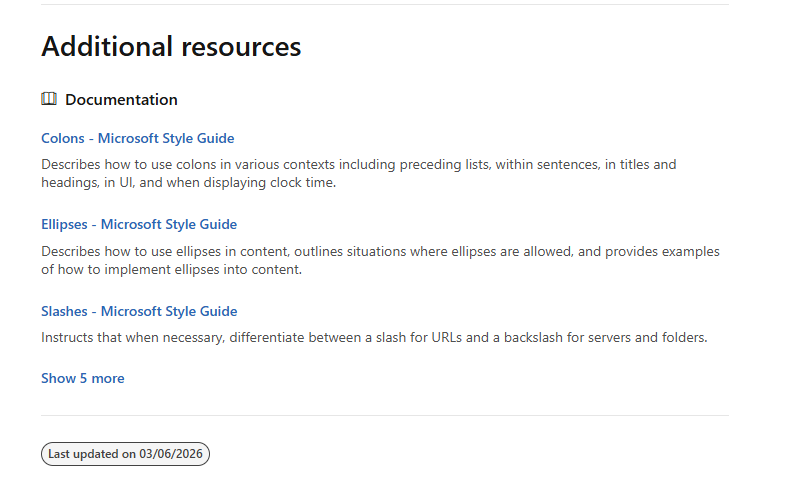
That is not hypocrisy so much as a sign that style rules and web reality are different systems. A page can discourage hyphens as sentence punctuation while still using hyphenated resource names because those names behave like technical objects.
A link is not always a sentence fragment. It can be:
A page title
A route or slug
A product feature name
A UI label
A generated heading
A stable label used across docs
Changing punctuation in those cases can create inconsistency rather than clarity.
A better rule set for technical editors
Technical editors need context-based rules. Here is a practical starting point.
Context | Preferred approach |
Normal prose | Follow standard punctuation rules |
Number ranges | Use an en dash where the style guide requires it |
Compound modifiers | Use a hyphen when it prevents misreading |
Link text | Preserve the source title, UI label, or site pattern unless it harms readability |
URLs and slugs | Do not 'correct' punctuation for style |
Commands, code, and file names | Treat characters as literal and untouchable |
Navigation labels | Match the product interface |
Search-oriented headings | Prefer clarity, consistency and expected wording |
The key question is not 'Which dash is correct?' The better question is 'What job is this string doing?'
Link text needs its own rule
Link text sits between prose and interface. It must be readable, but it also carries expectations. If every item in an 'Additional resources' list uses hyphens as separators, one edited en-dash can look precious or inconsistent.
For example:
`Install-the-SDK`
`Configure-authentication`
`Troubleshoot-build-errors`
These are not elegant prose titles. They are web labels. A proofreader may dislike them, but changing them one by one does not improve the documentation. It creates drift.
A better editorial rule would be simple: do not normalise dash usage in link text unless link text was authored as prose.
That protects technical accuracy while still allowing editors to fix genuinely poor copy.
Localisation workflows need fewer blanket corrections
English-to-English review in localisation often pushes every text type through the same filter. That causes problems. A marketing paragraph, an API method description and a button label should not systematically receive the same treatment.
Translation memories also punish unnecessary punctuation changes. One changed dash can create fuzzy matches, extra review and pointless debate. In developer-facing content, consistency with the product often matters more than typographic purity.
This does not mean 'anything goes'. It means the style guide should name the exception instead of pretending it does not exist.
The new rule is functional, not typographic
Use classic dash rules in running prose. Use product and platform rules in technical strings. Preserve literal strings. Match UI text. Respect slugs and generated labels. Treat link text as a special case.
The goal is not to abolish punctuation standards. It is to stop applying print rules to every piece of web copy as if context did not matter.
Technical editing needs a wider lens. Sometimes the 'wrong' hyphen (the developer's 'simple dash') is doing the right job.
[AI-generated copy with human editing and oversight]


Comments